
Download and install
Steps from download to launch.
Download the Windows or macOS version from the top page.
Windows
- Run the downloaded installer.
- If “Windows protected your PC” appears, select “More info” → “Run anyway”.
- Launch it from the Start menu.
macOS
- Move Caramel Board to the Applications folder.
- On first launch, right-click → “Open”.
- If it won’t open, allow it in System Settings > “Privacy & Security”.
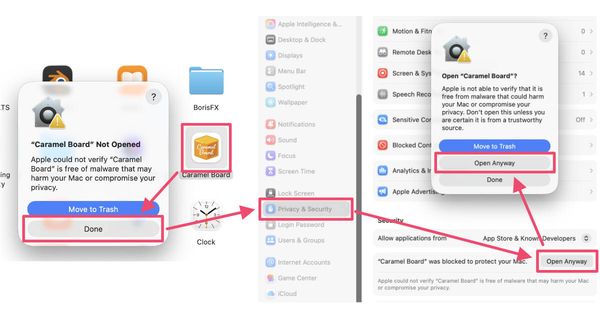
Because this is a BETA build, the OS may show a confirmation during install.
System requirements
- Windows 11 or later / macOS 26 or later (Apple Silicon)
- You operate it in a browser (Chrome and Safari supported)
- The old CLI and Docker versions are no longer updated → About migration
Next, go to Initial setup.
Last updated: 2026-07-06